What you get
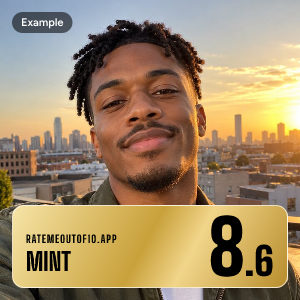
Every photo comes back as a card sealed in a graded slab, like a collectible: an overall score out of 10, a grade name from Fair to Gem Mint, five subgrades, a one-line comment and one tip for a better photo.
Scores of 6 and up unlock rarer slabs, from an Uncommon pearl label to a Legendary black one.
How the score is made
An AI vision model, Jev, looks at your photo and answers plain yes-or-no questions, such as “Would most people call this person attractive?” Your score is how strongly it agrees, put on a curve where most people land between 5 and 8.
The five subgrades work the same way: eyes, skin, hair (style, if your hair is covered), vibe, and the photo itself. Light and angle move the photo grade most.
The grades
| Score | Grade | Rarity | Rank |
|---|---|---|---|
| 9 and up | Gem Mint | Legendary | S |
| 8 to 8.9 | Mint | Epic | A |
| 7 to 7.9 | Near Mint | Rare | B |
| 6 to 6.9 | Excellent | Uncommon | C |
| 5 to 5.9 | Very Good | Common | D |
| 4 to 4.9 | Good | Common | E |
| Under 4 | Fair | Common | E |
Rate a photo, not a face
The Rate my photo tab grades how well a photo is taken, not how anyone in it looks. People, places, food, pets: any real photo works. It comes back on the same slab with a score out of 10, five photo grades (light, focus, framing, background and mood), a style such as Golden Hour or Street, the one thing that makes it, and up to three specific tips for the next shot.
Each photo is judged by the standards of its own style. A dark, moody frame, film grain, direct flash, motion blur, a bold tilt or a casual photo-dump shot can score as well as a polished one when it's done on purpose; a missed focus or a murky accident still scores low.
Screenshots, drawings, memes and documents aren't graded, and neither are photos of anyone who looks under 18.
How accurate is it?
We tested the grader on the Face Research Lab London Set: 102 adult faces, each rated by thousands of people. Its scores agree with the crowd's average at r = 0.78. A single person agrees at about 0.60, and five people together at about 0.70, so it's closer to the crowd than any one rater.
It's still one photo and one model's opinion. Light, angle and expression move the number; a real smile added about 0.8 in testing.
Tips for a better photo
- Face a window. Soft daylight is the easiest upgrade.
- Hold the phone at eye level or a little above.
- Step back a little: close-ups make faces look wider.
- Try a relaxed, real smile.
- Hold still and wipe the lens.
- Show your eyes and look into the lens.
- Pick a plain background.
Privacy
Your photo is sent to our server and to TypeSafe, Jev's maker, to be graded, then dropped. We keep only a fingerprint of the image and its grade, so the same photo always gets the same grade. Your slabs are saved on your device.
If you sign in with Google, your account also keeps your ratings and the challenges you make, never the photos, until you delete it in the app. Cookies only run the app: one counts your free ratings, one keeps you signed in and one remembers your language.
A share link with your photo lasts 7 days unless you delete it, and you can share with your face blurred or the whole photo blurred. 18+ only. The privacy page has the details.
Questions
How attractive am I?
Upload a clear selfie and you'll get a score out of 10 in a few seconds, based on how most people would see the photo. Try a few photos: light and angle change the result.
Is the face rating accurate?
On a public research set it matches the average of thousands of human ratings at r = 0.78, closer than a single person gets. It's a fun estimate from one photo, not a fact about you.
Is it free? Do I need an account?
It's free. Your first 3 ratings need no account; after that, sign in with Google to keep going, up to 100 a day.
Why sign in?
To keep rating after your 3 free ones, and to keep your ratings and the challenges you send in your account, with how each board did, on any device. You can delete the account in the app at any time.
Do you keep my photo?
No. Photos are graded and dropped, and only the grade is cached. Saved slabs stay on your device, and a signed-in account keeps grades, never photos.
What do Gem Mint, Mint and the other grades mean?
The names come from trading-card grading: Gem Mint is 9 and up, Mint 8 and up, Near Mint 7 and up, Excellent 6 and up.
Can I share my grade without showing my face?
Yes. When you share, choose Blur face or Blur all. The image and the link are blurred the same way.
Can it rate my photo instead of my face?
Yes. Switch to Rate my photo and it grades the photo itself: light, focus, framing, background and mood. How anyone in it looks doesn't count.
Why did it ask for another photo?
Only when there's no real face, the face is too unclear to judge, or the person looks under 18.